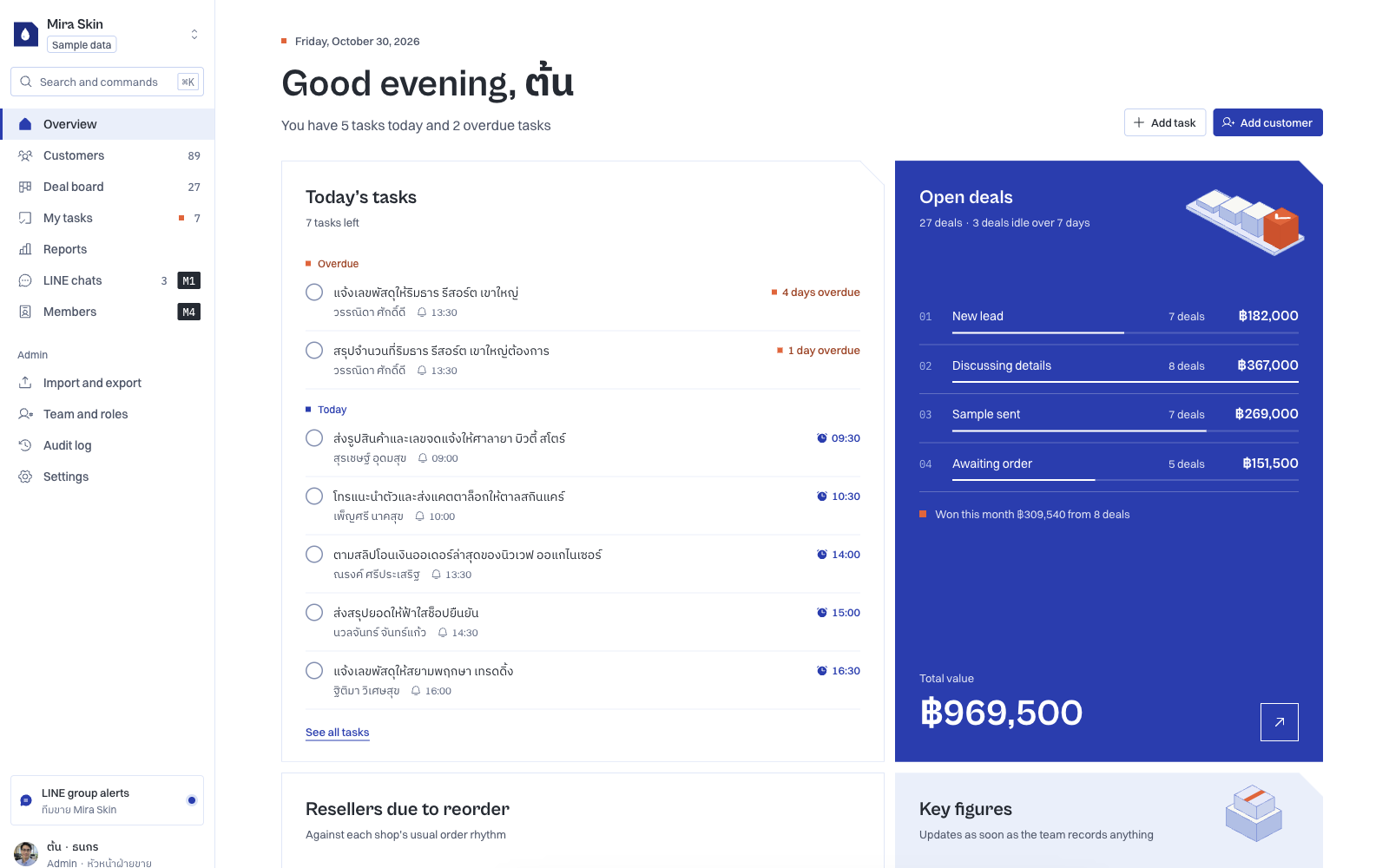
Cover: Talvyn Custom CRM demo, with an English interface and fictional Thai sample records. Figures are demonstration data, not customer results.
Two businesses can sell the same kind of product and run very different sales operations. One receives enquiries on LINE, sends samples and follows up for a first order. Another sells to companies, where a coordinator, a purchasing team and a budget owner may all affect the decision.
Both need a CRM. But “where is this customer in the process?” means something different to each team.
If the system only holds a name, a phone number and an open or closed status, people still need chat threads and spreadsheets to understand the work. The gap sits between what the CRM records and what the team needs to do next.
Talvyn Custom CRM starts with how a business works, then adapts the interface, data, follow-up stages and features around that process. A shared core supports common needs, while additional changes have an agreed scope.
Payne and Frow’s 2005 CRM framework connects strategy with cross-functional processes. It offers a useful lens for looking beyond the contact list to the wider customer relationship.
Two skincare brands, two sales processes
Consider two hypothetical brands. These examples explain workflow differences; they are not customer case studies.
The first sells through resellers. The relationship continues after the first purchase. The team needs to know who has received samples, who is considering an order and who may be due to reorder. Useful information includes reseller type, product interest, recent contact and the next commitment.
The second focuses on corporate orders. The person making the enquiry may not approve the purchase. The team needs to track contacts, decision makers, pricing conditions, documents and delivery requirements. “Waiting for a customer reply” and “waiting for internal approval” deserve different treatment because different people own the next action.
Give both businesses identical stages and a manager may see that a deal is stuck without knowing why. A salesperson then has to explain the missing context whenever work changes hands.
The design question goes beyond adding fields. Which information is essential at intake? What can wait? Who takes responsibility when the work moves forward?
Three differences your CRM should reflect
Data that supports a decision
A field should answer a question the team actually uses: which sample to send, who approves the quote or what needs checking before an appointment. More fields do not automatically produce a better fit.
The Talvyn demo uses different field sets for different business examples. Its settings also let a team choose which fields appear in the customer table. The practical aim is to help people identify the next action without opening every record.
Stages with a shared meaning
“Following up” is a weak stage if it contains sample delivery, quotation preparation and appointment booking. Agree what has to happen before work moves forward, who owns it and how a stalled item is handled.
Microsoft’s business process flow documentation describes structured stages that guide consistent work. Guidance and automated execution are separate design questions: moving a card does not, by itself, define what a connected system should do.
Screens that bring important work forward
A business owner may want to see bottlenecks. A salesperson needs the next customer to contact. Those needs help determine information hierarchy and the scope of an interface change.
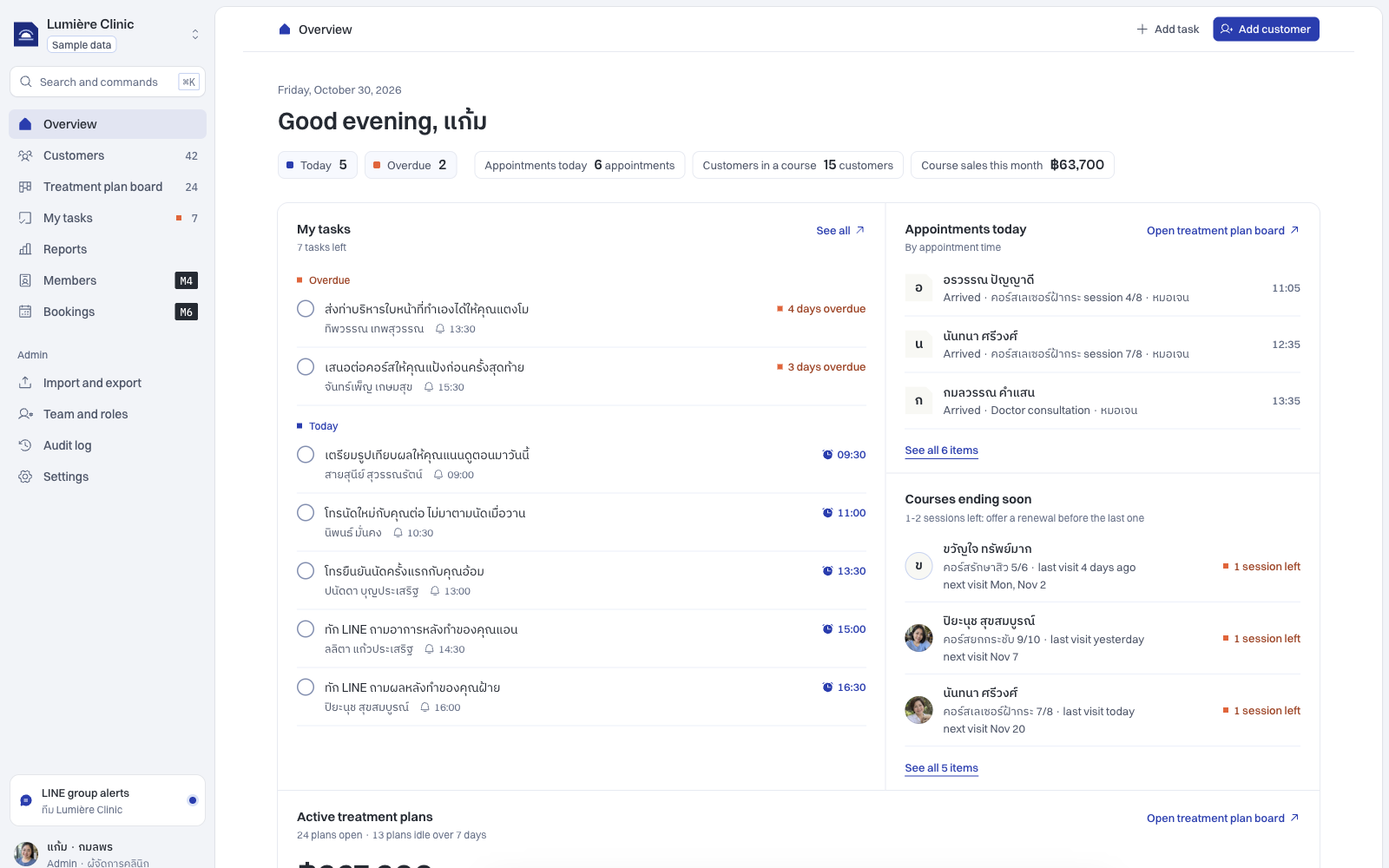
In the Mira Skin demo, the overview highlights reseller reorders and sample follow-ups. The clinic example instead brings appointments and courses nearing completion into view. The change goes beyond swapping a logo.
A shared core, with clearly scoped changes
Business differences do not require rebuilding everything. Customer records, follow-up history, assigned tasks and progress boards provide a useful common foundation.
Goodhue and Thompson’s Task-Technology Fit framework (1995) emphasises both actual use and fit with the supported task. Applied to CRM scoping, that suggests checking what already works before deciding what needs adapting.
Separate supported configuration, optional modules and custom development. Renaming a stage is a different job from connecting a company’s approval system. They should be assessed separately.
That distinction matters when discussing Talvyn Custom CRM. Start with the core needed to manage customers, configure the relevant information and views, then select modules or agree additional custom work. Interface, workflow and feature changes need a defined scope.
A configurable packaged CRM may already suit a team with standard processes. A team with distinctive handoffs, conditions or information needs should test those differences before choosing. GOV.UK’s user-needs guidance supports investigating people’s actual context before settling on a solution.
Test one customer journey before choosing
Take one customer from first enquiry to the end of the sale. Identify the intake information, the approvals, the owner of each handoff and the work that follows the sale, such as delivery, renewal or reordering.
If those answers are unclear, a longer feature list may add complexity without resolving the bottleneck. If they are clear, you can see where the CRM needs a different field, stage or screen.
Shape your CRM around the way your business works
If your team still switches between chats and spreadsheets to explain the same work every day, bring that workflow to Talvyn Labs. Share one sales journey, the current spreadsheet and the point where work slows down. We can use them to define the interface, workflow and features your CRM needs, with a scope you can review before committing.
Discuss your custom CRMRelated reading
References
- Talvyn Custom CRM demo, reviewed on 30 October 2026; fictional sample data.
- GOV.UK: Understand users and their needs.
- Microsoft Learn: Business process flows overview.
- Payne & Frow (2005): A Strategic Framework for Customer Relationship Management, Journal of Marketing.
- Goodhue & Thompson (1995): Task-Technology Fit and Individual Performance, MIS Quarterly.
External references support general design principles; they do not identify Talvyn’s technology stack. The demo illustrates usage. Production integrations and custom work require an agreed scope.